Products
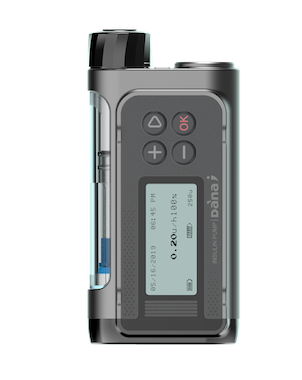
Diabecare DANA-i


Diabecare DANA-i Remote System is a smart insulin pump with discrete remote control.
- intuitive,
- intelligent,
- innovative,
- interoperable.
Diabecare DANA-i Remote System Enables you to...
Technical Specifications
BOLUS FEATURES
- • Bolus Increments in 0.05, 0.1, 0.5, 1.0 units
- • Alternative Bolus Duration: 12, 30, 60 sec for 1 unit
- • Extended Bolus (30 minutes - 8 hours)
- • Dual Pattern Bolus
BASAL FEATURES
- • Minimal Delivery Rate: 0.04 unit/hr
- • Basal Increments: 0.1 unit/hr or 0.01 unit/hr
- • Number of Rates Per Profile: 24/day, hourly
- • Temporary Basal: 1hr - 24 hrs, 0% - 200%
- • Number of Profiles: 4
MISCELLANEOUS FEATURES
- • Insulin Capacity of 300 units (3.0 cc)
- • Memory Recall: Bolus(300), Daily totals(60), Prime(60), Refill(60), BGM(420), Carbohydrate(300), Basal(1440 Hours), Alarm(50), Suspend(50), Temporary Basal(100), Error(100)
- • Average Battery Life of 2-3 Weeks (Depends upon insulin dosage)
- • IP68 rate (Pump)
SAFETY FEATURES
- • Button-Lock mode to prevent unintended operation
- • Alarm (Low Battery, Low reservoir, Occlusion, Missed bolus,Shutdown)
- • Fail-safe Function
- • Bolus Frequency Restriction
- • Active Insulin Monitoring
SUPPLEMENTARY FEATURES
- • Carbo/Bolus Calculation Program
- • Button Scroll
- • Vibrator
- • 13 Languages Supported
(Chinese, Czech, English, French, German, Greek, Italian, Korean, Lithuanian, Nederlands, Swedish, Turkish, Spanish) - • Weight: 86grams[3.03oz] including battery.
CUSTOMIZABLE FEATURES FOR INDIVIDUALS INCLUDING PROFESSIONAL CARE GIVERS
- • Audible reminders of Bolus insulin
- • Presetting of default boluses
- • PIN programming for healthcare professional / caregivers to access guided management features
Required Specification of Android Smartphone for AnyDANA-A
- • OS : Android 10(Q) or Later
- • Resolution : xhdip, xxhdip, xxxhdip or Higher
Required Specification of iPhone for AnyDANA-i
- • OS : iOS 12 or Later
- • Model : iPhone SE2 or Later
Safety Information
Intended use
The Diabecare DANA-i is intended for the subcutaneous delivery of insulin, at set and variable rates, for the management of diabetes mellitus in persons requiring insulin. The pump is intended to be used both alone and in conjunction with digitally connected medical devices for the purpose of drug delivery, such as receiving, executing and verifying commands from digital connections, including automated insulin injection software. Also, the device is not intended for use with blood or blood products.
Contraindication
Patients whose vision or hearing is impaired to recognize the signs on the screen of the insulin pump or the alarms from the insulin pump. Patients who are not able to operate the insulin pump or to change DANA Infusion Sets and DANA 3cc Syringe regularly as the instruction manual guides for avoiding contamination, if a helper is not provided.
General Precautions
- 1. Pump users need more than 4 blood glucose measurements per day, and vision and hearing to receive any pump alarm.
- 2. Confirm regularly that the screen display turns on, you can hear audible beeps, and feel the vibrate. If these features are not working, discontinue use of the pump and contact a healthcare professional or technical support from the local Insulin Pump distributor.
- 3. Patients must not open the Pump housing or handle any internal components.
- 4. The Diabecare DANA-i Insulin Pump is intended for use with a proprietary Infusion Set, reservoir and other accessories specified. DO NOT use the Pump with any other infusion system or accessories.
- 5. Press buttons with the pad of the finger. DO NOT use fingernails or any sharp objects.
- 6. The Insulin Pump comes with factory default settings and alarms,
maximum daily totals, basal and bolus doses. These settings can be
adjusted by a healthcare professional.
Glucose Check Alarm0minMaximum Daily Total80uMaximum Bolus40uMaximum Basal3.3u/h
- 7. The pump is indicated for use with U-100 insulin. The other insulins have not been tested and may not be compatible for use with the Diabecare DANA-i insulin pump.
- 8. Change the reservoir and the Infusion Set regularly, as recommended by healthcare professionals. DO NOT use for longer than the intended period.
- 9. Check the expiration dates and dispose of any expired accessories.
- 10. Avoid impact damage such as dropping. If there is any known damage of pump and accessory, contact a healthcare professional or technical support from the local Insulin Pump distributor.
- 11. For any trouble with any of the system components, turn off the Insulin Pump by removing the battery and contact a healthcare professional or Insulin Pump trainer.
- 12. Remove the battery for long-term storage.
- 13. If remote control is not intended to be used, it is suggested to turn the BLE off by activating ‘Airplane Mode’ to prevent unintentional delivery.
- 14. If you forgot pump password, contact technical support from the local Insulin Pump distributor.
- 15. Check your infusion site daily for proper placement and leaks. If you notice leaks around the site replace infusion set.
- 16. When the memory is full, the oldest data is deleted in order and the latest data is saved.
- 17. If a cybersecurity-related threat is detected, please contact the manufacturer.
- 18. The Insulin Pump is for single-patient use only. Do not use this product on more than one patient.
Cybersecurity Precautions
-
1. Security features applied to the system
- • The AnyDANA app and the insulin pump are designed with security features to ensure user safety and data protection. When the app and pump communicate via Bluetooth, they connect using "Authenticated Pairing" (requiring a pairing key entry), and all data transmitted thereafter is encrypted. This prevents unauthorized devices from connecting to the pump and stops third parties from accessing or tampering with the communication.
- • These security features are built into the app and pump by default. Users do not need to configure them separately.
-
2. Precautions During Use
- • Do not leave the insulin pump and the mobile device with the installed app unattended.
- • Do not share the pump’s serial number, pump password, or the authentication code displayed during pairing with others. Do not take photos of or post online any screens displaying this information.
- • Do not control the pump using apps or software not approved by Manufacturer. The use of unauthorized software may lead to unexpected insulin delivery, potentially causing serious harm.
- • Do not connect the pump to unauthorized third-party devices.
- • Pay close attention to notifications, alarms, and alerts from the pump and the app. Unsolicited pairing requests or connection notifications may indicate that a third party is attempting to access the device.
- • Exercise caution when using the device while connected to untrusted networks, such as public Wi-Fi.
-
3. Precautions for pairing
- • The app communicates only with the paired pump. The pairing process involves a brief period that is sensitive regarding security, during which there is a possibility of an unintended device attempting to connect. Please follow the guidelines below when pairing.
- • Perform pairing in a location with few people and other devices nearby.
- • Approve the pairing only after verifying that the authentication number displayed on the pump screen matches the one shown on your mobile device.
- • After pairing is complete, confirm that the connection status is correctly displayed on both the pump and app screens.
- • If you receive a pairing request that you did not initiate, do not approve it; cancel the request immediately.
-
4. Actions to Take When Losing, Transferring, or Discarding the Device
- • If you lose your mobile device, set the pump to Airplane Mode until it is connected to another mobile device.
- • Before transferring your mobile device to another person or discarding it, delete the AnyDANA app and remove the pump's pairing information.
- • If you no longer use the pump, delete the AnyDANA app and pairing information, and remove the battery from the pump to ensure it no longer operates.
-
5. Actions to Take in Case of Abnormalities
- • Consult a healthcare professional immediately if you suspect that the insulin pump settings or insulin delivery amount have changed unexpectedly, or if you experience symptoms of severe hypoglycemia or diabetic ketoacidosis.
- • If you suspect that a third party is attempting to connect to or interfere with the device, stop using it and contact manufacturer immediately.
- updated on 2026-09-14